
-
Unraveling Genomics – Some insight into the use of genomics testing and its application in commercial cow-calf herds

Link to the original article or read on below
Written by Clint Peck and published by Beef Magazine April 13, 2026
Sometimes the prom queen and the prom king should’ve never had children—or sometimes it’s a match made in heaven.
That’s the mantra resonating from Leoma Donsbach when she talks about the science of genomics and beef cattle breeding. The difference in cattle is that we can peek under the exterior to examine the genetic compatibility of the prospective parents.
And to minimize “wasted matings” in their cow herd, Donsbach and her husband, Kirk, ranch near Roy, Montana. And for the past several years, the Donsbach’s have been wrapping the science of genomics around their cows in an effort to get everything they can out of the genetics they bring onto the place.
Leoma Donsbach worked for the American Simmental Association for 12 years. There, she said she found her “home” as genomics testing started becoming commercially available around 2009.
“When Simmental started down that path, I quickly saw how we were investing in the future,” Donsbach said. “That work really sparked my interest in pedigrees, and I could see that genomics was the wave of the future.”
Genomics in cattle breeding was progressing slowly at that time, though, much due to the high cost of analyzing complex and massive datasets. Genomic testing in cattle uses single nucleotide polymorphism (SNP) technology to analyze thousands of DNA markers (typically 10,000–100,000) from an animal’s tissue sample.
Any breakthrough in the technology required affordable, high-throughput SNP marker analysis for specific animal traits and accurate phenotypic recordings. That in turn required substantial computer power to generate accurate genomic-enhanced expected progeny differences (GE-EPDs) provided through breed associations.
Therefore, it’s taken some time for genomics to reach beyond the seedstock sector and show promise of paying off for commercial cattle ranchers.
“For seedstock producers, genomic testing is a no-brainer,” explained Tara Felix, PhD, beef cattle specialist with PennState Extension. “For commercial cattlemen, as genomic testing costs continue to drop, genotyping females should become increasingly popular to capture extra value.”
Herds with a superior genetic profile have a fundamental advantage over other herds, and in many cases will outperform their contemporaries over their lifetime, Felix added.
“The use of GE-EPDs on the bull side and genomic testing on the heifer side are critical,” she said. “Using good selection techniques will allow producers to choose and develop the right replacement heifers and consistently mate them to complementary sires to optimize profitability.”
And that’s the hang-up, Donsbach said—finding ways to translate the information generated by genomics testing into tangible use by cattle producers. She likens it to hiring a CPA who knows the thousands of provisions in the tax codes to help manage taxes.
That “need” led Donsbach to start her own enterprise, Data Genie LLC. in 2015. She created the company following a stint at Neogen, where she served as a strategic account manager. Today, through collaborations with partners such as Allied Genetic Resources, she continues to champion adoption of genomic tools, precision mating, and data-driven management to accelerate genetic progress and profitability.
“Genomics was coming on the scene for precision mating and we wanted to begin using the concept to help commercial cattle producers,” she explained. And Donsbach’s job is to understand genetic evaluations inside and out, regardless of the breed.
Donsbach described genomic testing as buying a pickup. “You can get the base model, then you can start adding bells and whistles, depending on what you want and what you can afford.”
She used “stayability,” or functional longevity (FL) as defined by the Angus breed, as an example of a trait that can be enhanced through genomic analysis. The FL EPD predicts the number of calves a sire’s daughter is expected to produce by six years of age compared to other sires in the population.
“If stayability is really important to you as a cow-calf producer, we can select for females that really do stay in the herd and are optimal for the environment,” she said.
Genomics analysis permits better accuracy for younger animals and allows a clear picture of several genetic traits of interest, added Felix, especially those that are expensive to measure, such as feed efficiency, carcass traits in breeding stock, reproductive traits, or maternal traits in bulls.
Genomic evaluations can also be used to avoid inbreeding depression in cattle. This reduction in phenotypic performance—such as fertility, growth, and health—results from the mating of related individuals. Donsbach said genomics has revolutionized how inbreeding depression is studied by providing more accurate measurements than traditional pedigrees.
And Zoetis Inc. recently announced the launch of bovine respiratory disease (BRD) genetic predictions in INHERIT® Select for commercial cow-calf operations. This test is an upgrade to its INHERIT Connect test for seedstock.
“This is a breakthrough for the beef industry,” said Brett Bristol, head of Zoetis Precision Animal Health. “For the first time, producers can make selection and breeding decisions based on GEPDs for BRD health and survival in addition to production traits.”
Bristol said that long term these types of innovations are expected to have meaningful economic impacts on commercial cow-calf producers and downstream to backgrounders and feeders.
Penn State’s Felix advised producers to keep in mind that with all these benefits, genomically enhancing the EPDs does not change how the EPD can be used; it just increases its accuracy.
“When a producer buys a young bull that has GE-EPDs, he’s buying with the same level of confidence in that animal as one that has already sired between 10 and 36 calves, depending on the trait,” Felix said. “In this way, GE-EPDs increase accuracy in those animals much earlier in their lives.”
Going back to her “prom king/prom queen” scenario, Donsbach points to the basics—sometimes there are things going on underneath the hide in gene combinations that, with genomics producers, have the ability to evaluate and from which to make more informed mating decisions.
“If you’re someone who’s keeping replacements, we can rank them in order of maternal genomic merit,” she said. “Genomics can help you with heifer selection— help to produce those heifers of your dreams with more consistency.”
And it can help on the sire side by choosing bulls that are truly complementary to a herd’s females while avoiding those “wasted matings”—and avoid that sick feeling when a buyer eyeballs a set of calves and asks, “Where did those calves come from?”
Donsbach recognizes that there are still ranchers who say EPDs don’t work, and she respects their opinion.
“But I would say that EPD’s overall have done what they were intended to do, which is give us more insight into the average predicted value of that animal’s offspring,” she said. “And genomics takes us a step further—a big step further.”
-
Data Genie offers genomic insights to cattle producers
By MORGAN KUNTZ-GARRISON
Dec 24, 2025Read the original article published by Farm & Ranch Guide here
With a deep background in cattle DNA testing and genomics, Leoma Donsbach started Data Genie in 2015 with the goal of building a company that could help seedstock producers navigate the often-confusing maze to get their cattle registered.“I had a dream there could be a business that could serve cattlemen in addition to helping breed associations get the data they need in the form they need to drive their evaluations forward,” Donsbach said while explaining her reason for starting the company.
In the early days of the company, Donsbach said she truly acted as a mediator between producers and the breed association they affiliated with, more often than not receiving handwritten barn notes from a too-busy rancher. She would shift through the data in the notes, organize it in the way the breed association requested, and offer insight and education to the producer when helpful.
What started as a side gig, morphed into a full-time business in 2022, and since then, Data Genie has grown and evolved into a company that now serves 90 clients across 25 different states that are affiliated with seven different breed associations. Presently, Data Genie offers services for both seedstock and commercial producers. The company’s mission is straight-forward and cutting edge – they wish to empower cattle producers to make confident, data-driven breeding decisions by transforming raw records into clear insights.
Data Genie’s seedstock services look much the same as they did 10 years ago when the company started. Registered clients employ Data Genie to help with all aspects of breed reporting, evaluation, and data collection.
“Our job is to make sure all of the T’s are crossed and the I’s are dotted so that the animals being put out into the marketplace are fully representative on paper, as well as in person,” Donsbach explained.
For commercial producers, data – especially genomic data – has not traditionally been a part of the industry, but Data Genie has found a way to offer individual and herd genomic insights on non-registered cattle.
For commercial producers, genomic data can be attained via an ear punch tissue sample. Data Genie partners with Allied Genetics and industry-leading bovine geneticists to access tissue samples and provide raw data on the individual animal. With the data, producers come to learn about their cows at their core genomic level and from there are better able to build intentional breeding matches that will mitigate risk and capitalize on their herd’s full genetic potential.
Donsbach tries to drive home with her customers that the cattle industry is evolving, and she is sincere and respectful when she says, “This isn’t your grandfather’s ranch anymore.” Modern day producers have access to much more data and breed performance metrics, and the key to being successful in cattle ranching, Donsbach argues, is mindfully balancing the traditional physical evaluation of cattle with cutting edge genomic testing.
“It’s the art of combining what we see with what’s going on underneath the hide,” she articulated.
There is no “short term” in the cattle business, so any breeding decisions that are made right now have the potential to impact your herd decades into the future. By offering cow herd genomic evaluations and with the possibility of running that genomic information comparatively against potential bull prospect, Data Genie provides cattle producers with the information they need to purchase bulls with confidence knowing they can achieve targeted breeding objectives.
“What we are doing is helping producers make desirable matings that lead to desirable calves,” Donsbach added.
The genetic information available to producers through Data Genie and their geneticist partners is really a “treasure trove.” Commercial producers can learn what cows have stronger maternal traits and therefore are more likely to raise ideal replacement heifers versus what cattle have stronger genetic potential for terminal traits. Understanding your herd at a deeper level, Donsbach says, can help producers raise a more uniform calf crop and tap into unrealized profitability within their herd.
“If we can help elevate the bottom 25 percent of your herd, what is that worth to you as a producer?” she asked.
Continuing, Donsbach said if a producer starts to home in on genomic evaluations within their herd, they can start to see real, measurable results in as little as three years. In a long-range business like cattle ranching, it is as close to an “overnight” change as you can realistically get.
It all boils down to efficiency. You can’t change what you can’t measure, and ultimately, data is power. Data Genie works to put power in the hands of the producer so they can confidently buy bulls and retain heifers knowing they will produce a calf crop that will excel in their environment and not leave genetic potential on the table.
“It’s important to keep our eye on the horizon and ensure that the investments we’re making in our bull battery are the best we can possibly make, especially since the bulls we turned out in 2025 will still be directly impacting our herd in 2042 if those daughters stay in production for 10 years,” Donsbach stated.
Data Genie offers a portfolio of different genomic testing options and reporting services for both commercial and seedstock producers. Donsbach encourages interested producers to reach out to her personally to discuss Data Genie’s services and to see what services will best fit their operation. Leoma Donsbach can be reached via e-mail at cattledatagenie@gmail.com or by calling (559)-696-4941. Data Genie is present across all social media platforms or by visiting datageniellc.com.
-
IGS Updates to CE & MCE EPDs
EPDs posted from the 11/18 run included evaluation changes to Calving Ease (CE) & Maternal Calving Ease (MCE)
What does this mean?
IGS made three improvements that make Calving Ease (CE) & Maternal Calving Ease (MCE) predictions cleaner, more accurate, and more consistent. With change comes some re-ranking and additional spread from highest to lowest values. The information IGS released is at the bottom of this post, and here’s the Data Genie interpretation & breakdown.
Breed and Decade Interaction Effect Updates
– More stable, consistent EPDs
– Less noise when a breed or time period has minimal data
– Will allow for cleaner comparisons across years and across different breeds in the IGS systemExternal EPD Incorporation
– More predictable calving ease trends in a multi-breed evaluation with considerations of internal and external informationMarker Effects
– CEM is now a genomic EPD which means we’ll see higher accuracy for this trait
– Improved predictions for MCE
– Updated handling of relationships between related traitsSummed Up
Model improvements always cause some level of movement. We trust that IGS performed their validation process effectively and that this update will better characterize the genetic potential of animals for calving ease (direct and maternal). So far, with this update, we are noticing a shift in the CE mean coupled with an increased range of EPDs for many animals CE and to a lesser degree MCE EPD values moved lower, even though their relative % ranking within the breed may be similar to before. If anything appears inconsistent or doesn’t line up with what you expect in your herd, please flag it and we can help review, and work with the association on explanations as needed.I know it’s tough while we’re living through one, but evaluation updates are a necessary and healthy part of genetic progress. As new data, methodology, and computing power becomes available, the IGS system will continue to evolve and that’s a good thing. There’s rarely an ideal time to release updates, but we have to work with what we’re given. The focus now should be reviewing your herd specific data and using percentile ranks to help interpret any changes, alerting if something is out of sync. If you have questions on specific animals or need a report sent to help evaluate your animals, and are a client, please reach out to us because that’s exactly what Data Genie is here for.

Adapted from: ASA (https://herdbook.org/simmapp/template/epdAnalytics%2CPurebred.vm and https://herdbook.org/simmapp/template/epdAnalytics%2CHybrid.vm)
Updates to CED and CEM Genetic Evaluation – from IGS
International Genetics Solutions (IGS) has updated the calving ease direct (CED) and calving ease maternal (CEM) genetic evaluation. These updates have increased the efficiency and prediction accuracy of the evaluation. Three updates were made as outlined below.
Breed and Decade Interaction Effect. Previously, a breed and decade interaction was fit as a random effect. Some breed x decade groups had sparse representation causing decreased evaluation efficiency. Now, breed and decade effects are decoupled, or fit as two separate effects.
External EPD Incorporation. Previously, external EPD were included directly in the coefficient matrix. Now, external EPD are included after the internal EPD analysis. This will allow the impact of external EPD information to be more clearly compared.
Marker Effects. Previously, marker effects for maternal effects were not included. Now, methodology has been developed that has the ability to fit marker effects for direct and maternal effects simultaneously. CEM EPD are now genomically enhanced. In addition, updates to the covariances between marker effects for different traits included in the evaluation were also updated.
These updates have undergone an extensive validation process and prediction accuracy of the CED and CEM genetic evaluation has improved. Members may see slight re-ranking as a result of these changes. Members with any questions regarding these updates or specific animals’ EPD can reach out to the breed Association staff or board members for more information.
-
There’s a Lot of Info in That Little TSU

DNA testing and EID ear tags pair well.
Updated July 29, 2025 12:06 PM

Read the full article on the Drover’s website. It was great to collaborate with Burt and share about the power of the information we’re collecting in those little vials.
-
Commercial Producers – EPDs
Commercial cattlemen, this one is for you. If you want EPDs generated by the largest multi-breed genetic evaluation in the world, you can absolutely have them, but you need to enroll your calving age females with ASA.
Leoma Donsbach, Data Genie LLC https://www.simmental.org/site/index.php/asa-programs/asas-programs/total-herd-enrollment-the
-
DNA and Mis-Identification of Samples
As we continue to see an increase in DNA submissions, we have also seen an increase in the mis-identification of samples. I get it, it happens. We are only human and processing cattle can get a bit fast paced at times. However, we want to emphasize it is CRITICAL to assign a dedicated individual to collecting the DNA samples and noting down the ID to help prevent mistakes as much as possible. Here are a few ways you might set yourself up for success chute side and in the office.
✅ Try to minimize the “jobs” that the DNA collector has and allow them to focus on getting the sample, marking down the ID on the TSU box and then checking the tag again, marking it down in the notebook with the running list of animals.
✅ You may have picked up on the suggestion of having a notepad/laptop and/or way to track a list of the animals in the order they came through the chute. This comes in handy if we ever have a question if an animal was written down wrong on the TSU box. The likelihood that you won’t catch the mistake right then by checking the tag twice and writing it down twice, minimizes.
✅ If there’s a question on an animal or a “no tag”, etc. make sure to note that down or anything else that might prove helpful at a later point if the DNA does not check out.
✅ If you’re a Data Genie client, you can take photos of the TSU boxes, text/email those and we will put together the DNA paperwork and testing requests with the corresponding Associations.
⚠️ If you place the information on a spreadsheet, make sure the correct barcode is attached to the correct animal record, especially if you sort the spreadsheet during the process. An easy way to double check is to sort by TSU barcode once you have everything entered and then cross reference to your boxes. Keep the TSUs in the boxes (see example below) until you’re ready to ship them.
✅ Once you have DNA paperwork/manifests, go through line by line, remove the TSU from the box and place into a Ziploc bag. This is another opportunity to ensure the correct ID is matched up to that TSU barcode. Print and enclose the necessary DNA paperwork inside the Ziploc with the samples. Ship in a padded envelope/box with bubble wrap to address supplied in the instructions.
💯 You have done your due diligence to ensure the samples are matched up to the correct animals which is very important, especially if you’re running genomics so the genotype is matched up to the right individual for the evaluation.
⚠️ A reminder, when you receive DNA results back on an animal, those results are based upon the sample submitted and linked to that record. If the sample is not labeled accurately, then all of the corresponding information is incorrect with regards to that animal it’s attached to. It is imperative to determine whether the correct animal was sampled when you’re exploring DNA mishaps and should always be a consideration in the DNA process, especially if results aren’t as you expected.
#DataGenie

-
Benefits of Submitting Transfers to the Association
If your spring sale has come and gone, payments and delivery has been completed, please get the transfer information submitted to your Association. Even if the buyer indicates they do not want the papers, here’s a few reasons why it may be beneficial to submit them anyway.
Animal lists and inventories can get quite lengthy if a membership is not transferring ownership of registered cattle. Similar to a vehicle title transfer, if you submit the necessary paperwork through the Association, the record of the sale will be filed and if something comes up down the line or the animal exchanges hands again, you may save yourself chasing down old ghosts to try and get it sorted out. Outlined below is a bit more information on transferring with various breeds.
 The first transfer on an animal in the Simmental database is always FREE of charge. As an added perk, NEW buyers get added to the SimTalk magazine list for up to 2 years. Red Angus will transfer FREE of charge for the first 60 days after the date of sale Gelbvieh will transfer FREE of charge if you’re an active AGA member, non-members pay $20.00.
 Angus charges $5.00 if transferred within 30 days, $7.00 between 31-60 days. NEW buyers will get added to the Angus Bulletin magazine list which is published 5x per year. Hereford charges 5.00 if transferred within 30 days, $8.00 thereafter Charolais the first transfer is FREE for natural/AI calves if enrolled in Whole Herd Reporting (WHR) and submitted within 30 days. If not in WHR it is $8.00 for bulls, $12.00 for heifers, if transferred within 30 days, fees go up from there Limousin charges $20.00 if transferred within 60 days, $30.00 if submitted after 60 days.
*Always verify fee information with your respective Association prior to submitting as they are subject to change.

-
RightBull – Precision genomic selection tools for the future of commercial beef production

Written by : Marty Ropp – Allied Genetic Resources
Many of you have seen the unprecedented results created by the RightMate and RightChoice tools for precision matings in the beef genetics industry. Now, Top Genomics is moving forward with tools that employ the same, cutting-edge technologies, but in a format that is more suited to the way most commercial herds breed cows and make decisions.
The basis is simple. Some bulls just genomically match some females more completely, while some should never be considered for that particular cow even if he is a wise choice for many others. This works very well for AI situations and small breeding groups. For larger groups of breeding females however, the same genomic factors can still apply. Genomically, some sires just complement a given group or herd of females better than others. This is especially true when you include the potential to optimize genetic diversity and include program breeding objectives. The bottom line is that the sire decisions you have made in the past make your herd unique and have culminated in females with certain genotypic strengths and weaknesses. That genetic package in your cow herd is what you work with every day and that history is important. What is crucial moving forward however are the decisions associated with the next generation. Which bull(s) or genetics should you purchase to create the outcome you want the most often and improve the uniformity of your calf crop and future cow herd?
With a genomic snap-shot of your commercial cow herd, it is possible to sort a group of sale bulls or AI candidates to best match your particular situation and wishes in a way that provides substantially more insurance of success than just paging through a catalog or walking from pen to pen. RightBull gives you a ranked list of the bulls you should consider from an offered group, then you make the decisions from that short list based on the traits and factors you favor when purchasing seedstock. Better decisions more often is the result. The bulls on your list might be completely different from the ones on your neighbors list, all based on the genetic decisions you have made over the years.
The process:
- Access (if genotypes are currently available) or genotype a minimum of 25% of the existing cow herd. This minimum percentage may differ slightly depending on group sizes and total females to mate, but the more females genotyped the more accurate the evaluation. For some this will be a decision to genotype the entire herd or at least all of the young females. The information delivered to Top Genomics must be in the form of raw genotypes and not genomic scores (please contact Allied for Questions) in order to get the core information needed for RightBull.
- Get permission from you seedstock provider to access to the genotypes and EPDs of the potential bulls to consider, then transfer that information along with the genotypes of the cow herd to Dr. Mahdi Saatchi at Top Genomics LLC. If he already has those genotypes, the process is even easier.
- Participate in a conversation with staff regarding your mating plans and breeding objectives so that the results can be better customized to your management practices and genetic goals.
- Top Genomics will provide you a RigthBull ranking and %Genomic Match for bulls in that particular offering for you to use as an important “first sort” in preparation for purchase.
- Please allow 5-8 weeks from the time you collect DNA samples to expect results, but just 2 weeks for the RightBull evaluations to be completed if your cow’s genotypes are already available.
Additional options:
- RightBull is also available for Seedstock producers wishing to access unique genetics from an offering.
- Choosing ideal heifer bulls is great strength of the RightBull and RightMate technologies. You choose the level of risk you feel appropriate and Top Genomics will help you make wise choices. Not every heifer or group of heifers needs an extremely light birth weight bull as most producers know, but some heifers are quite high risk for challenge. RightBull can help give you confidence of the genomics in your heifer group and help make financially better decisions for sire choices. One at a time in the case of AI or group by group for natural service.
- Another popular program is for Top Genomics to sort females in the herd based on more similar genetics into groups that will more closely match specific bull selections.
- It is also an option to sort a cow herd into groups based on desired outcomes and then prescribe different bulls based on the breeding objectives for each group. A typical example might be to sort a maternal group or groups and then sort females designed to be mated terminally. The idea is to maximize grow and calf value from the terminal group, while making balanced and maternal value choices for the remaining females. Generating more profitable and predictable results is the result.


-
Red Angus – New Genetic Mutation Identified – Exercise-Induced Collapse (EC)

In case you missed it, in the latest Red Angus eNews they now have a DNA test available for Exercise-Induced Collapse (EC) available through the Red Angus Association of America (RAAA).

From Dr. Lindsay Upperman’s article (read the full article by clicking on the link below) here’s an overview of EC.
EC is best described as an exercise intolerance during strenuous activity, which presented in the original animals as exaggerated fatigue or muscle twitches, leading to the animals laying down or collapsing. “After a period of rest most calves were able to recover, however in a percentage of cases with extreme or repeated physical exertion, the condition can be fatal.” Researchers located a variant in the PYGM gene. This gene breaks down glycogen in skeletal muscle and the mutation causes this not to happen and leads to the exercise intolerance in affected calves. Another key is the researchers also noted a negative effect on the meat quality of affected calves due to the buildup of glycogen, resulting in higher pH and dark cutters on the rail. It’s also important to note the mutation is a autosomal recessive genetic mutation so the sire and dam both need to carry one copy for the offspring to be affected.Here is the information regarding EC testing, sharing verbatim from RAAA eNews.
In the July/August issue of Red Angus Magazine, Dr. Lindsay Upperman detailed a newly identified genetic mutation in Red Angus cattle known as exercise-induced collapse. Based on this discovery, a DNA test has been developed to identify potential carriers of EC.
At this time, the RAAA board of directors has NOT changed the rules and regulations regarding EC and whether it will be monitored. The board will continue evaluating EC over the coming months, and more information will be made available soon.
In the meantime, EC testing is now available. Please use updated DNA order forms to request this test found here and here. You may note EC in the defects column when submitting a new sample. If you would like to test animals that have already been DNA tested, send an email to DNA@redangus.org with the animals registration numbers and specify that you wish to have EC testing completed.
The cost of this test is $25 per head for TSU and blood samples, hair samples are $30 per head and semen samples are $27 per head. An additional $2 sample pull fee will be applied if testing is performed on samples already on file.
For questions regarding this new mutation, please reach out to Dr. Lindsay Upperman at lindsay@redangus.org. For EC testing or ordering questions please email the DNA department at DNA@redangus.org.
Information supplied in this post was referenced and sourced from the January 22, 2025 Red Angus eNews along with Dr. Lindsay Upperman’s article in the July/August Red Angus Magazine.
-
Mature Cow Weight Reporting – ASA
I’m the first person in line to say, reporting mature cow information to the American Simmental Association (ASA) is NOT intuitive or user friendly. You have to be very careful how it is submitted because it’s really easy to load the dams you want to report mature data on “as animals” and update the information which unfortunately, reports the data to the dam of the female you actually collected the information on. I can’t tell you how many times this has happened but based upon folks reaching out to me, it’s too many. Read through these instructions before you submit mature cow data to ASA, might be very useful and prevent mis-reporting.
First, the easiest way to do this in my opinion is to go to Data Entry, select Download. On the left, select the group of animals you wish to report mature cow information on, on the right, select Expanded File, under Load group select Dams. Then select file type, Download.

This will provide you with an excel file and the dams loaded “as dams”. In column AK you will enter the cow weight, column AM is for Body Condition Score (BCS) and column AN is for the date the measurements were taken. If you happened to collect a hip height there’s a spot for that in column AL. Enter in your data to the spreadsheet, save. Go back to Herdbook Services, Data Entry, Upload. Type in a title for your job, select Animal Data as the job type and then browse, locate your saved spreadsheet and click on Upload File.
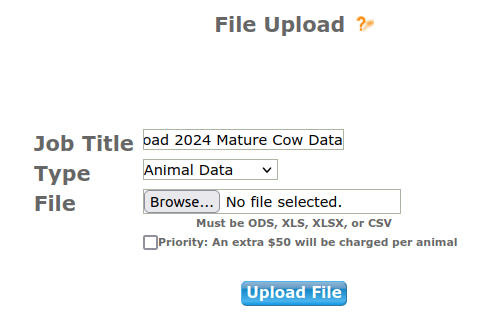
Once your file uploads you will either see a Proceed to Billing or a Edit Job button. If you have an Edit Job button that means there are errors that need to be corrected before ASA can accept the data. Click on it and it’ll take you into your incomplete job. There will be red shading at the end of the data row and if you click on the tab that says Errors an explanation is provided. For example, you cannot use a .5 measurement for BCS scoring, it must be a whole number, i.e., ASA does not accept a 5.5, it needs to either be a 5 or a 6.


If you click on the BrthDam tab, you can correct the data which should clear your errors. When you have no errors, under the Animal tab there should NOT be anything filled into the AnmRegNbr or AnmTatt fields if you’re only updating mature cow information in the job (obviously this is different if you’re reporting weaning weight information on a set of calves and mature dam data at the same time, you would have the calves loaded as animals and be updating mature dam data under the BrthDam tab on the dams) but let’s keep it simple in this example and stick to mature cow data only being submitted. Everything under the Animal tab should be blank except the first two columns, dam ASA number and Dam Tattoo.

Click on Submit Data. Job runs through error checks, if all is well click on Proceed to Billing and there should be no charge to add mature data, select Final Submit. Job submitted successfully. If you wish to review the data you have a few options. You can create a custom report to capture that information and it will appear under your HerdMgmt > Reports > Custom Reports for you to easily review the data in a spreadsheet.

Or you can access the information on an individual cow basis via Animal Search, locate the animal, at the bottom right hand corner click on Cow Summary, scroll down to Mature Data and there it is.

If you have any questions on submitting Mature Dam information, I would encourage you to reach out to the Association so they can get those answered. As always, if you’re a Data Genie client, we take care of all this for you and send you back over a nice summary sheet to review, no sweat.

 datageniellc.com