
I’m the first person in line to say, reporting mature cow information to the American Simmental Association (ASA) is NOT intuitive or user friendly. You have to be very careful how it is submitted because it’s really easy to load the dams you want to report mature data on “as animals” and update the information which unfortunately, reports the data to the dam of the female you actually collected the information on. I can’t tell you how many times this has happened but based upon folks reaching out to me, it’s too many. Read through these instructions before you submit mature cow data to ASA, might be very useful and prevent mis-reporting.
First, the easiest way to do this in my opinion is to go to Data Entry, select Download. On the left, select the group of animals you wish to report mature cow information on, on the right, select Expanded File, under Load group select Dams. Then select file type, Download.

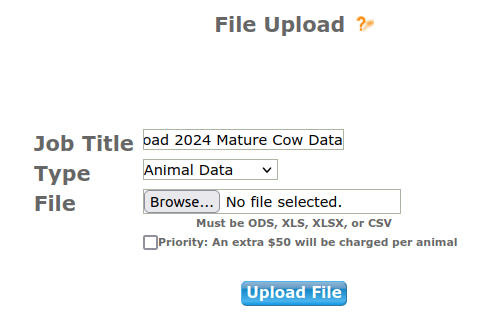
This will provide you with an excel file and the dams loaded “as dams”. In column AK you will enter the cow weight, column AM is for Body Condition Score (BCS) and column AN is for the date the measurements were taken. If you happened to collect a hip height there’s a spot for that in column AL. Enter in your data to the spreadsheet, save. Go back to Herdbook Services, Data Entry, Upload. Type in a title for your job, select Animal Data as the job type and then browse, locate your saved spreadsheet and click on Upload File.
Once your file uploads you will either see a Proceed to Billing or a Edit Job button. If you have an Edit Job button that means there are errors that need to be corrected before ASA can accept the data. Click on it and it’ll take you into your incomplete job. There will be red shading at the end of the data row and if you click on the tab that says Errors an explanation is provided. For example, you cannot use a .5 measurement for BCS scoring, it must be a whole number, i.e., ASA does not accept a 5.5, it needs to either be a 5 or a 6.


If you click on the BrthDam tab, you can correct the data which should clear your errors. When you have no errors, under the Animal tab there should NOT be anything filled into the AnmRegNbr or AnmTatt fields if you’re only updating mature cow information in the job (obviously this is different if you’re reporting weaning weight information on a set of calves and mature dam data at the same time, you would have the calves loaded as animals and be updating mature dam data under the BrthDam tab on the dams) but let’s keep it simple in this example and stick to mature cow data only being submitted. Everything under the Animal tab should be blank except the first two columns, dam ASA number and Dam Tattoo.

Click on Submit Data. Job runs through error checks, if all is well click on Proceed to Billing and there should be no charge to add mature data, select Final Submit. Job submitted successfully. If you wish to review the data you have a few options. You can create a custom report to capture that information and it will appear under your HerdMgmt > Reports > Custom Reports for you to easily review the data in a spreadsheet.

Or you can access the information on an individual cow basis via Animal Search, locate the animal, at the bottom right hand corner click on Cow Summary, scroll down to Mature Data and there it is.

If you have any questions on submitting Mature Dam information, I would encourage you to reach out to the Association so they can get those answered. As always, if you’re a Data Genie client, we take care of all this for you and send you back over a nice summary sheet to review, no sweat.


 datageniellc.com